
No edit summary |
|||
| Line 1: | Line 1: | ||
The '''[[Action Replay]]''' is a [[Game Enhancer]] device for the Gameboy Advance. It was created by [[Datel]]. As with most Action Replays it allows the user to input cheat codes. It is basically the same as the [[GameShark (Gameboy Advance)|GameShark for GBA]], in fact there was software available that would turn the GameShark into a Action Replay. There was also a automatic game recognition system which automatically selected the cheat code list for the game that was inserted. It is also possible to download codes from | The '''[[Action Replay]]''' is a [[Game Enhancer]] device for the Gameboy Advance. It was created by [[Datel]]. As with most Action Replays it allows the user to input cheat codes. It is basically the same as the [[GameShark (Gameboy Advance)|GameShark for GBA]], in fact there was software available that would turn the GameShark into a Action Replay. There was also a automatic game recognition system which automatically selected the cheat code list for the game that was inserted. It is also possible to download codes from Datel's website onto your PC and then transfer them to the Action replay with a USB cord. Or you could simply type in the desired cheats using the included software and transfer them. | ||
==Screenshots== | ==Screenshots== | ||
Revision as of 19:25, 29 November 2008
The Action Replay is a Game Enhancer device for the Gameboy Advance. It was created by Datel. As with most Action Replays it allows the user to input cheat codes. It is basically the same as the GameShark for GBA, in fact there was software available that would turn the GameShark into a Action Replay. There was also a automatic game recognition system which automatically selected the cheat code list for the game that was inserted. It is also possible to download codes from Datel's website onto your PC and then transfer them to the Action replay with a USB cord. Or you could simply type in the desired cheats using the included software and transfer them.
Screenshots

Hardware
-

Action Replay
-
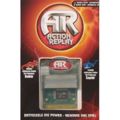
Action Replay Packaging
-

Action Replay Packaging
-

Ultimate Codes: Pokemon Packaging
-

Action Replay GEX Packaging


External Links
| Action Replay | |
|---|---|
| PC | |
| Commodore 64 - Amiga - MS-DOS PC | |
| Consoles | |
| NES - Master System - Super Nintendo - Genesis - PlayStation - Saturn - Nintendo 64 - Dreamcast - PlayStation 2 - Xbox - Gamecube - Wii | |
| Portables | |
| Game Boy - Game Gear - Game Boy Advance - DS - PSP - 3DS |